Amazon EMR is a powerful but notoriously complex AWS service for processing large amounts of data. Customers struggled to learn it, often leaving the product to search for help elsewhere. I designed a feature called Learning Center, which is a subject matter education section and media icons built directly into the EMR console where customers can find tutorials, videos, diagrams, and expert tips exactly when they need them, without ever breaking their flow. The educational material is managed through a newly designed product CMS.
Project E2E workflow
01
Problem & Persona Research
Identified EMR's steep learning curve and mapped the distinct customer personas — admins, engineers, analysts — struggling with it.
02
Customer Feedback Analysis
Surfaced three critical findings: knowledge gaps, missing contextual information in the UI, and reduced time-to-value from context switching.
03
Solution Proposal
Defined a two-part solution: a curated in-console resource repository and an integrated contextual help system mapped across the EMR UI.
04
Competitive Research
Analyzed how other platforms surface in-product learning and contextual help to inform layout and interaction patterns.
05
Design Exploration
Explored layout and content hierarchy directions for the Learning Center page and its asset types.
06
Contextual Help Integration
Designed inline contextual help patterns mapped across the EMR console so guidance appears where users need it most.
07
Process Design
Defined the content workflow and asset management process powering the Learning Center behind the scenes.
08
Validation & Feedback
Tested the concept with customers and stakeholders, documented expected impact, and gathered feedback for iteration.
01 — Overview
Creating a Learning Center to reduce EMR's steep learning curve
Amazon EMR (Elastic MapReduce) is a managed cluster platform for processing vast amounts of data using open-source frameworks like Apache Spark, Hadoop, and Presto. Despite its power, customers consistently struggled with the service's complexity and steep learning curve.
The proposal: Create a new "Learning Center" page in the EMR console to provide on-the-spot, critical information about the most integral features and workflows of the service to help customers complete their tasks successfully and expediently.
“The learning curve is steep and long, even for long-time EMR users, who use this service for years.”
— EMR Solution Architect
02 — Understanding the Problem
Customer personas and pain points
EMR serves multiple customer personas, each with distinct needs and workflows:
Persona 01
Data Platform Administrator
Initiates and manages EMR clusters, sets up Studios and Serverless applications. Primary interface: EMR Console and Studio.
Persona 02
Developer & Data Engineer
Creates and manages Studios, builds data pipelines, prototypes notebooks. Uses EMR Studio, Serverless, and JupyterLab.
Persona 03
Data Scientist
Builds and runs ML models in interactive environments. Access Serverless application endpoints and JupyterLab.
03 — Research & Discovery
Three critical findings from customer feedback
Through collaboration with the product SA team and analysis of customer feedback, we identified three major pain points:
Finding 01
Knowledge Gap
A lack of user understanding of key product capabilities and potential features within the platform.
Finding 02
Contextual Information
While documentation existed, the UI lacked helpful contextual information that users needed during their daily tasks.
Finding 03
Reduced Focus
Jumping out of the platform to learn about features while performing timely functions distracted customers and reduced product TTV (time-to-value).
What customers told us:
“EMR's documentation is difficult to digest. It has too much technical content, which is hard to understand for certain audiences.”
“There are YouTube videos showing how to use the old interface, but no videos showing how to use the new one.”
“As a student, my course is on previous console interface so I'm switching to it.”
04 — The Proposal
A two-part solution: Asset repository + UI mapping
The Learning Center would serve as both a centralized resource hub and an integrated contextual help system throughout the EMR console.
Part 1: Curated Repository
Behind the scenes, the EMR Learning Center would be a managed collection of expert-generated, subject-matter resources for quick-access insights.
Customers could search by subject and access various asset types:
Getting started tutorials: Step-by-step instructions, videos, and diagrams
Video clips: Internal and external content on key features
Diagrams: Visual illustrations of critical workflows
Expert recommendations: Tips from SAs and other users
Part 2: Asset Mapping
Throughout the EMR console, at key workflow areas, there would be "Learning Center icon clusters" mapped to relevant Learning Center assets.
UI would feature resource icons in critical workflows such as:
Creation flows: Cluster creation, Studio setup
Administration: Monitoring and cluster management
Data processing: Steps, batch jobs, Spark notebooks
EMR on EC2 cluster creation, for example, can be challenging, so adding helpful insights in critical areas could help customers complete the task successfully and quickly.
04B — Competitive Research
Learning from industry examples
I researched how other data platform companies approached learning resources and in-product education. Two standout examples informed the design direction:
Databricks provides a robust "Learn" section with documentation, events, training & certification, demos, and extensive resources. Their approach includes video content, demo library, and organized learning paths that help users navigate complex data platform capabilities.
Starburst organizes resources by type (Data Sheets, Case Studies, Videos, eBooks) with filtering capabilities. Their Data Mesh Resource Center provides curated access to specialized content, demonstrating the value of well-organized learning materials for complex technical products.
These examples validated the approach of creating a dedicated learning hub while also highlighting opportunities to differentiate through contextual help integration directly in workflows.
05 — Design Exploration
Initial wireframes and information architecture
The Learning Center page would feature categorized resources with flexible viewing options and search functionality. I explored information architecture, wireframe layouts, and interaction patterns.
Information ArchitectureLearning Center Structure and Navigation
The IA defines how customers navigate from any EMR page to the Learning Center, browse categorized content (tutorials, videos, diagrams, resources, integrations, recommendations), and access detailed resource pages or recommendation pages. Toggle views between thumbnail/list and table formats.
WireframeDiagram Repository and Modal Interactions
The wireframe shows how diagrams are organized in the repository (left) and how they can be expanded in a modal view (right) for sharing and downloading. This provides customers with visual learning resources that can be easily accessed and shared.
WireframeTutorial Detail Page — "How to Create an EMR on EC2 Cluster"
Tutorial detail pages provide overview, prerequisites, expected outcomes, notable reviews, and suggested steps with share and download options. Users can also play/download tutorial audio files for learning on-the-go (walking, driving, flights).
06 — Contextual Help Integration
Mapping resources to workflow touchpoints
Once EMR built a repository of resources, the proposal was to integrate Learning Center assets with existing workflows by mapping them to task-critical points throughout the UI.
ConceptResource Mapping Strategy
The UI would feature resource icon clusters (video tutorials, diagrams, tips) at key workflow positions such as creation flows, administration and monitoring, and data processing tasks. For example, EMR on EC2 cluster creation can be challenging, so adding helpful insights in critical areas could help customers complete the task successfully and quickly.
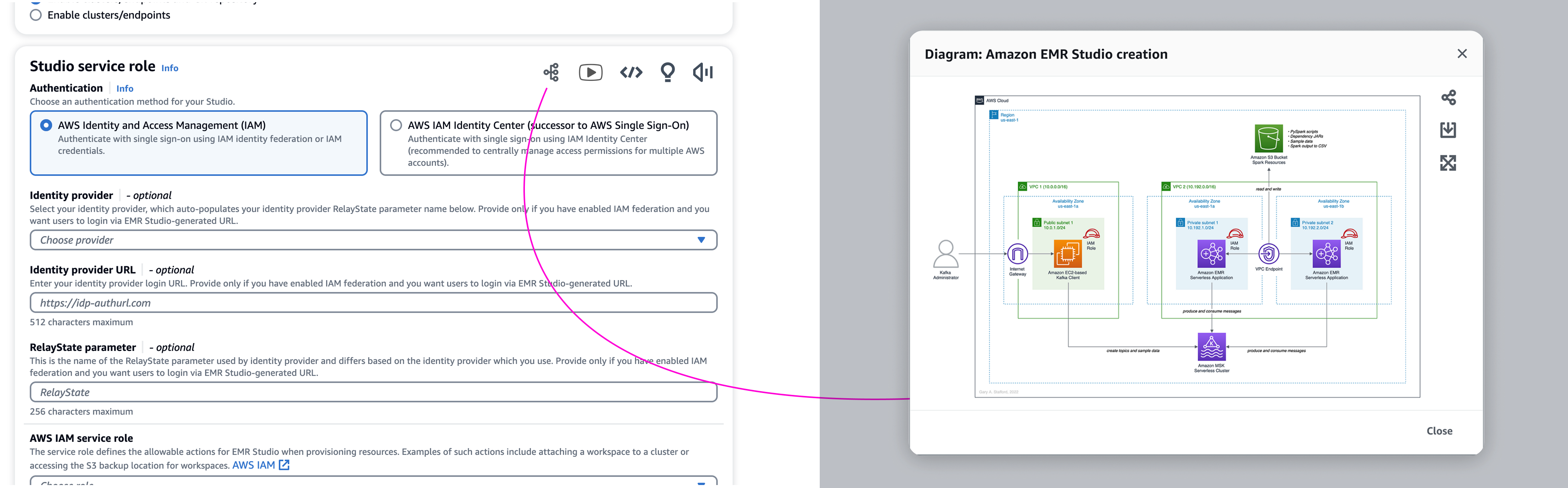
UI IntegrationKnowledge Cluster Icons — EMR Studio Creation Flow
Resource icon clusters appear at key workflow positions where specific knowledge gaps may exist. In the EMR Studio creation flow, icons provide access to diagrams that open in modals, offering visual explanations of complex workflows at the exact moment customers need them.
07 — Process Design
Learning Center asset management workflow
A critical component of the proposal was defining how assets would be created, reviewed, and integrated into the Learning Center. The process includes eight key steps:
Process Flow8-Step Asset Management Process
The workflow starts with identifying knowledge gaps from customer feedback, deciding on asset type (video, diagram, audio, etc.), collaborating with experts to create resources, reviewing and finalizing content, entering into the repository, implementing in the UI, mapping to relevant locations, and finally tagging and monitoring for effectiveness.
8-Step Asset Management Process:
Step 1: EMR team identifies specific knowledge gap item based on customer feedback and metrics
Step 2: Team decides how to address the gap (video, diagram, webinar, audio, eBook, blog, etc.)
Step 3: Resource creation — Team collaborates with AWS experts, marketing, product experts, and dev to produce the asset
Step 4: Knowledge gap item creators share item with EMR team for review and finalization
Step 5: EMR team enters new asset into the Learning Center Quip repository with categorization, definitions, feed links, and owners
Step 6: Dev team enters knowledge gap item into the EMR Learning Center UI category container
Step 7: UX and dev teams map knowledge asset from Learning Center to relevant UI locations
Step 8: New knowledge gap resource is tagged and monitored for interaction and effectiveness
ImplementationFrom Creation to Implementation — 3-Step Integration
Once created, resources follow a three-step path: (1) entered into EMR repository, (2) added to Learning Center UI with proper categorization, and (3) mapped to relevant UI locations via reference icons to provide on-the-spot contextual help throughout customer workflows.
08 — Expected Impact
Benefits for customers and AWS
The Learning Center initiative aimed to deliver value across multiple dimensions:
Increased adoption & retention: Relevant feature information drives engagement
Console value-add: Incentive to use console vs. CLI/SDK
Cross-service consumption: Potential for business in affiliated AWS services
09 — Validation & Feedback
Continuous advocacy and iteration
Throughout the concept development, we conducted multiple deep-dive presentations with partners, an org-level UXDD (UX Design Discussion), and specific meetings with solution architects to present and discuss the initiative.
Key feedback themes:
“Centralize Learning Center insights into categories. Include cross-service insights.”
“Include a robust LC insight search engine — Gen AI.”
“Diagrams and images — Start with animated gifs. Audio files — Learn on the go (walking the dog, driving to work, flights, road trips).”
“Customers are giving up on search — Go to Google, ChatGPT. Simplified gen AI experience.”
Next steps defined:
Continue partner discussions (PM, docs, dev)
Conduct qualitative research and customer interviews (internal and external)
Additional workshops with service experts, PMs, dev, and UX
Validate North Star, problem, value, process, and growth metrics
Draft a formal process for insight asset management
The EMR Learning Center project exemplified the role of design in advocating for customer needs within a large organization. While the concept faced challenges around desirability, feasibility, and viability, the process of research, design, and continuous stakeholder engagement helped surface critical customer pain points and propose tangible solutions.
Key learnings from this project included the importance of starting with an MVP approach, building cross-functional alignment through workshops and presentations, and using customer quotes and feedback as powerful advocacy tools. The wireframes and process documentation served not just as design artifacts, but as conversation starters that helped the broader team visualize possibilities and discuss tradeoffs.
This project reinforced my belief that great design work isn't just about the final deliverable — it's about facilitating important conversations, challenging assumptions, and relentlessly advocating for the customer experience.