CloudOne · 2016–2017 Product Design · CRM Platform

CloudOne CRM Platform

Consolidating four disjointed platforms into a unified, elegant CRM solution for automotive dealerships and advertising agencies.

Role
Senior Product Designer
Employer
CloudOne
Timeline
2016–2017
Team
Cross-functional (Design, Eng, Product)
← All work
01 — Overview

Unifying four platforms into one

CloudOne works with car dealerships and advertising agencies to automate and perfect their customer acquisition strategies. The company offers a targeted package of print and online advertising, a robust call-center, and a sophisticated CRM platform dealerships and agencies utilize to zero in on customers and mobilize them into the showrooms.

“CloudOne was offering four separate, complex, and disjointed data management web platforms to its customers. Our users needed a simpler and more efficient unified platform.”
02 — Problem • Task • Action • Results

From fragmented to unified

Problem

Four disjointed platforms

CloudOne was offering four separate, complex, and disjointed data management web platforms to its customers. Our users needed a simpler and more efficient unified platform to organize the data for its frustrated users.

Task

Consolidate & redesign

As the Sr. product designer for CloudOne, I needed to consolidate the four platforms and redesign a single, unified, and elegant platform to simplify our users’ data management process.

Action

Cross-functional design leadership

I led my cross-functional team in the design process of a unified CRM platform.

Results

Improved & unified platform

We released an improved, unified, simplified, and polished CRM platform, making our users’ workflow easier and delightful.

03 — Discovery & Research

Understanding the problem

The first step was to identify the core issues with the existing platforms. Users were forced to switch between four different interfaces, each with its own design language, navigation patterns, and data structures. This created confusion, inefficiency, and frustration.

Audit Identifying the Problem — Isolated and Outdated Business Platforms
Four separate, disjointed business platforms that needed consolidation
The four legacy platforms CloudOne customers were forced to navigate: BDC call center, campaign reporting, dealer admin, and the original CloudOne admin.

Talking to customers

I conducted interviews and gathered feedback from key customers including major dealerships and advertising agencies.

Tonkin Acura Nissan Marin Lakeview Ford iHeart Media Premier Kia Louisville Dodge Xcel Media

Through these conversations, I identified the key pain points and user needs that would drive the design direction.

Wireframing & information architecture

I mapped out user flows for key tasks like sharing content, viewing campaign data, and managing leads. This helped us understand how to consolidate functionality from four platforms into intuitive workflows.

Working collaboratively with the team, I organized the information architecture using card sorting and affinity mapping to ensure the new structure made sense to our users.

Wireframe Dashboard Layout Exploration — Responsive Grid Structures
Wireframe layouts exploring dashboard grid structures
Exploring different layout arrangements for the dashboard at various breakpoints, establishing the responsive grid foundation.
05 — Design System

Building a scalable foundation

Part of this project also involved creating a new design system that would provide consistency across the entire platform and enable faster development.

Grid system

I developed a flexible grid system that could accommodate different widget sizes and layouts, ensuring consistency while allowing for customization based on user needs.

Spec Responsive Grid System — Pieces & Combinations
Responsive grid system with flexible column pieces and layout combinations
Column pieces (1, 1/2, 1/3, 1/4, 1/8) and their responsive layout combinations across breakpoints.

Primary navigation

Spec Primary Navigation — Component Specifications
Primary navigation component specifications
Navigation bar specifications: sizing, spacing, typography, colors, and responsive behavior at 800px+ and sub-800px breakpoints.

Dashboard ticker

Spec Dashboard Ticker — Widget Specifications
Dashboard ticker component specifications
Ticker widget specs: typography hierarchy, spacing, trend indicators, and responsive behavior for the key metrics bar.
06 — Key Features

Platform capabilities

Feature 01

Unified Dashboard

A single, customizable dashboard that provides users with at-a-glance insights into their key metrics, replacing multiple disconnected views.

Feature 02

Data Visualization

Interactive charts and graphs that make complex campaign data easy to understand and act upon.

Feature 03

Campaign Management

Streamlined tools for creating, monitoring, and optimizing marketing campaigns across multiple channels.

Widgets Dashboard Widget Library — Data Visualization Components
Dashboard widget library with gauges, charts, KPIs, and data visualizations
The full widget library: KPI cards, donut charts, bar charts, line graphs, lead funnels, performance tables, and geographic breakdowns.

The redesigned platform

Dashboard

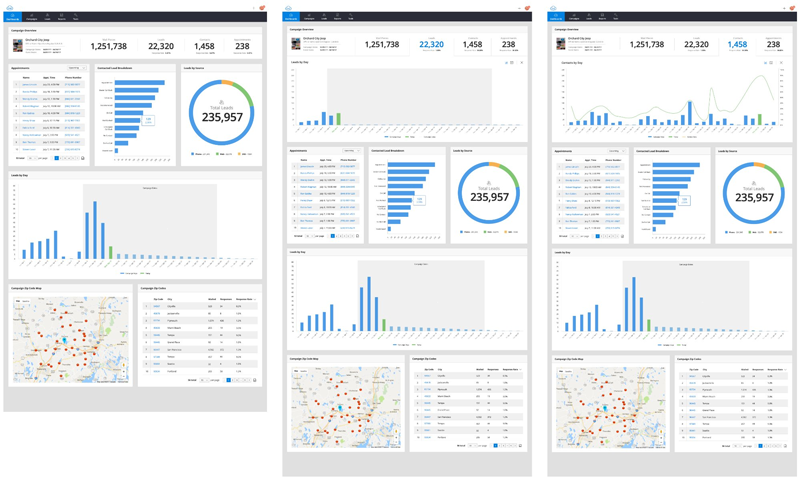
The redesigned dashboard provides users with customizable widgets showing dealer count, population coverage, lead performance, and month-to-date trends—all in one unified view.

Hi-Fi Campaign Dashboard — Overview with Charts & Geographic Data
Redesigned campaign dashboard with interactive charts and geographic data
Campaign dashboard showing summary metrics, appointments, leads by source, leads by day, and campaign zip code map across three responsive states.
Hi-Fi Agency Dashboard — Expandable Ticker & Campaign Performance
Agency dashboard with expandable ticker and campaign views
Agency-level dashboard with expandable agency overview ticker, top performing campaigns, leads by source, and campaign list table.

Campaign management

Campaign pages give users comprehensive views of performance metrics, including mail pieces, leads, contacts, appointments, and response rates.

Hi-Fi Campaigns — List View with Expandable Detail Rows
Campaign list with expandable rows showing detailed metrics
Campaigns list with inline expandable rows revealing key metrics for each campaign without leaving the page.

Lead management

The lead management system provides detailed lead information, activity history, and contact management in a clean, organized interface.

Hi-Fi Leads — List View with Sortable Columns
Lead management list view with sortable columns and disposition indicators
Leads list with comprehensive data columns, color-coded disposition indicators, and pagination.
Hi-Fi Lead Detail — Consolidated Information & Activity Timeline
Lead detail view with applicant info, activity timeline, vehicles, and notes
Lead detail consolidating applicant, vehicle, employment, activity timeline, and notes in a single scrollable view.
Hi-Fi Lead Editing — Inline Modal Form
Lead creation modal with structured form fields
Inline lead editing with organized form sections for name, contact, and address information.
08 — Before & After

Transformation

Dashboard

Before — Fragmented dashboards
Before: Multiple disjointed dashboard interfaces
After — Unified campaign dashboard
After: Unified campaign dashboard with clean data visualization

Lead list

Before — Basic data tables
Before: Basic agencies list with limited functionality
After — Rich lead management
After: Rich leads management with sortable columns and visual indicators

Lead detail

Before — Tabbed lead view
Before: Old lead detail view with tabbed interface
After — Consolidated lead detail
After: Consolidated lead detail with activity timeline
09 — Additional Features

Responsive design & white-labeling

Responsive design

The platform was designed to work seamlessly across desktop, tablet, and mobile devices, ensuring users could access their data anywhere.

Responsive Tools — Desktop, Tablet & Mobile Breakpoints
Responsive design across desktop, tablet, and mobile breakpoints
TV Spot Alignment tool shown across three breakpoints with adaptive navigation and table layouts.

White-labeling

Built-in white-labeling capabilities allowed agencies to customize the platform with their own branding, creating a seamless experience for their dealer clients.

White-Label iHeartMedia — Custom Branded Instance
White-labeled version of the platform customized for iHeartMedia
The platform white-labeled for iHeartMedia, demonstrating brand flexibility with custom logos, colors, and navigation theming.
4→1
Platforms consolidated into a single unified system
Reduced user training time and support tickets
Improved user satisfaction from customers and internal teams
11 — Reflection

What I learned

This project reinforced the importance of deeply understanding user needs before jumping into solutions. By spending time with customers and mapping their workflows, we were able to create a platform that truly solved their problems rather than just making the old system look prettier.

Leading a cross-functional team through such a significant redesign also taught me valuable lessons about stakeholder management, balancing technical constraints with user needs, and the importance of creating a shared vision that everyone could rally behind.

Return to portfolio