
Role
Product Design Lead
Employer
VMware
Scope
E2E Ordering & Deployment
Platform
VMware Cloud Services
Customer
Enterprise IT Operators
Delivery
GA Launch
Project summary
VMware Cloud on AWS Outposts is an on-site physical data center. It lets large enterprises keep their IT systems physically on-prem while still tapping into the AWS cloud. I was the design lead for the end-to-end ordering and deployment workflow, which is the experience customers go through to order the hardware, connect their AWS account, configure their on-premises infrastructure, and get everything up and running. It's a complex, high-stakes journey I designed from discovery all the way to GA launch.
Project E2E workflow
Customer & Problem Research
Gathered requirements from enterprise IT customers needing on-premises cloud with data sovereignty, compliance, and minimal disruption.
Competitive Analysis
Analyzed how similar enterprise hybrid-cloud ordering flows handled technical complexity, contract commitments, and multi-step configuration.
Team Workshop Facilitation
Led a cross-functional Miro workshop producing personas, use-case maps, opportunity-area maps, and an E2E service blueprint.
E2E Service Blueprint
Mapped the complete customer journey from hardware ordering to SDDC deployment, aligning all touchpoints across design, PM, and engineering.
Ordering Workflow Design
Designed the 8-step ordering wizard covering AWS account connection, region/AZ selection, physical site setup, and infrastructure commitment.
SDDC Deployment Design
Designed the post-fulfillment deployment wizard that picks up after physical hardware delivery and guides customers through SDDC setup.
Prototyping & Hi-Fi Comps
Built clickable prototypes and hi-fidelity comps covering the full journey — ordering, deployment, email communications, inventory, and subscriptions.
GA Launch & Handoff
Delivered final design specs across all surfaces for engineering handoff. The product shipped to general availability on schedule.
VMware Cloud on AWS Outposts is a jointly engineered on-premises as-a-service offering, combining VMware’s enterprise SDDC software — vSphere, vSAN, NSX — with AWS’s I3EN bare-metal infrastructure. The hardware installs physically in a customer’s data center; management happens through VMware’s cloud portal.
The product gave enterprise IT organizations what they’d been asking for: keep workloads on-prem for data sovereignty and latency reasons, access native AWS services, and offload infrastructure management entirely.
The challenge: a new product category with no existing ordering flow to reference. Hardware delivery, cloud account linking, infrastructure configuration, and SDDC deployment all needed to work together inside one coherent SaaS experience.


After extensive customer interactions, core requirements came into focus. These weren’t abstract user stories — they were concrete pain points from IT operators trying to modernize without compromising compliance, data sovereignty, or the operational skills their teams had spent years building.
Research ran in parallel with early design. I recruited and scheduled sessions with enterprise IT operators using Acuity Scheduling, then synthesized findings in Dovetail and Confluence. Sessions surfaced how customers think about infrastructure procurement, their expectations for a cloud-managed ordering experience, and the gap between self-service and sales-led flows.


As product UX lead, I organized a cross-functional workshop on Miro before any screen design began. North star: a seamless E2E experience for customers to order, track, deploy, and consume VMware Cloud on AWS Outposts. Scope focused on the SaaS ordering workflow targeting our GA milestone, with PMs, engineers, UX architect, tech writer, and UI engineers in the room.


The ordering workflow was the centrepiece of the GA release. Each step addresses a distinct technical and operational decision — from naming a deployment to committing to a 3-year infrastructure contract.
Once the physical hardware was delivered and connected, customers received an email prompt to deploy their SDDC. I designed a 5-step deployment wizard that picks up exactly where the ordering workflow left off — scoped to the specific Outposts instance just installed. The Figma workspace grew to cover the complete journey end-to-end.


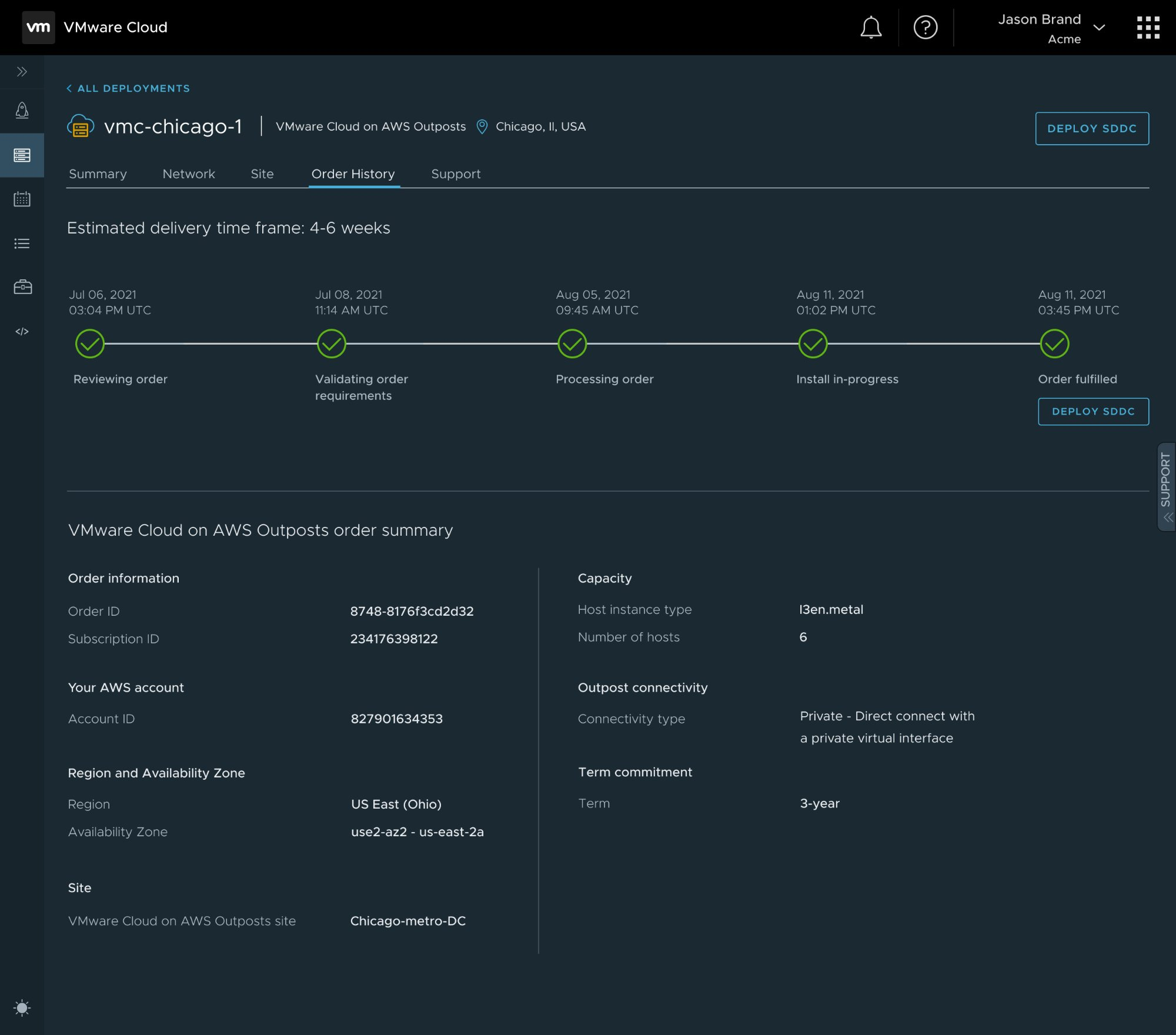
Ordering and deployment are split by the physical hardware delivery window. The design maintains continuity through email milestones, the Order History tab, and persistent status indicators — so customers never feel like they’re starting over after a month-long gap.
Site networking specs are shown via a “See site details” toggle rather than a separate screen — keeping the ordering flow clean while giving advanced users immediate access to the technical data they need before committing.
As customers adjust host count, total capacity recalculates in real time. This prevents over- or under-provisioning on a multi-year infrastructure commitment with no easy rollback.
CloudFormation, IAM roles, CIDR ranges, VPC/subnet selection — all deeply technical. Contextual help links written with the tech writer were embedded directly into the relevant steps to keep experts moving fast without stranding less technical operators.

